SampleDisco
Sample-level representation learning for single-cell multi-omics.
SampleDisco is a config-driven Python pipeline that turns single-cell RNA, ATAC, or unpaired multi-omics data into a unified sample-level embedding — combining multi-resolution cell-type composition with within-cell-type state shifts (RMD displacement) — and runs the full downstream stack of distance analysis, trajectory inference, differential testing, clustering, and visualization in a single call.
Workflow overview
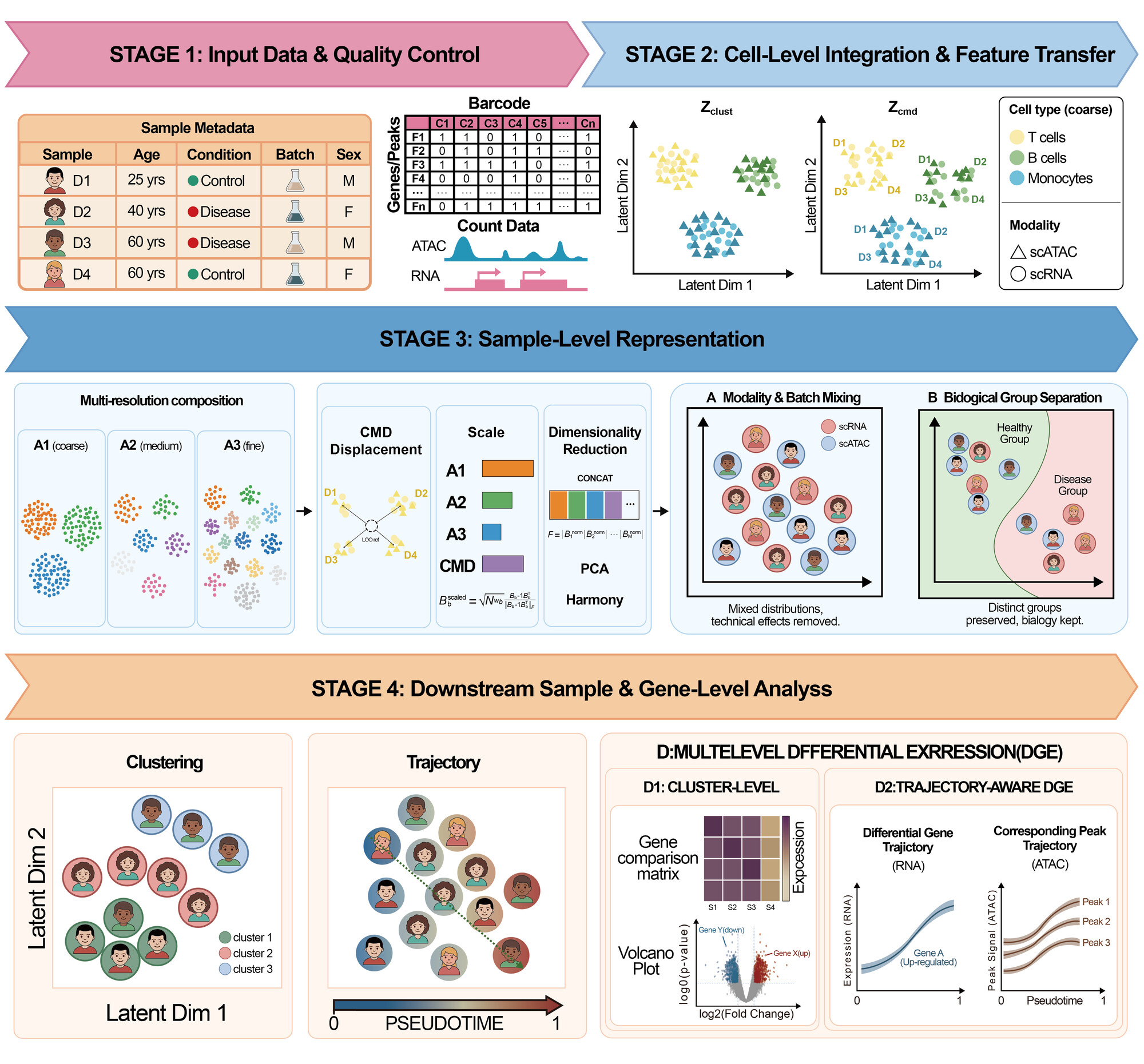
Four stages
- Preprocessing and QC. Filter cells and features, correct batch, build cell-level embeddings — a sample-removed view (
Z_comp) and a sample-preserved view (Z_rmd); objects written by earlier versions carry legacy key names that are still read automatically — via PCA/Harmony for RNA, TF-IDF/LSI/Harmony for ATAC, and scGLUE for unpaired multi-omics. - Cell-type assignment. Leiden clustering with optional target cluster count, or reuse of existing labels.
- Sample embedding. Multi-resolution cell-type composition blocks on
Z_compare combined with a reference-relative mean displacement (RMD) block onZ_rmd; the blocks are inverse-variance weighted, stacked, PCA-reduced, and Harmony-corrected at the sample level into a single embedding stored asadata.uns['X_DR_sample']. - Downstream analysis. Distance, trajectory, differential genes, clustering, visualization — all running off the same sample embedding.
Supported inputs
scRNA-seq— a single.h5ad; sample/phenotype columns in.obs(or an optional metadata CSV).scATAC-seq— a peak/fragment.h5ad; metadata in.obs(or an optional CSV).Multi-omics (RNA + ATAC)— paired or unpaired scRNA / scATAC, with a precomputed joint cell embedding (default: scGLUE).
Try it on the demo data
Two ready-made datasets (scRNA-seq + scATAC-seq, COVID-19 PBMC) and a one-command config are published on Zenodo — see Demo data to download and reproduce every tutorial.
Quick start
Run the full demo in three steps (after pip install sampledisco — see Installation):
# 1. generate a ready-to-run config (pre-wired to ./data/test_*.h5ad)
sampledisco --init-config config_demo.yaml

# 2. download the demo data into ./data  (full commands + checksums: Demo data page)
mkdir -p data
curl -L -o data/test_RNA.h5ad  "https://zenodo.org/records/22549611/files/test_RNA.h5ad?download=1"
curl -L -o data/test_ATAC.h5ad "https://zenodo.org/records/22549611/files/test_ATAC.h5ad?download=1"

# 3. run RNA + ATAC end to end
sampledisco -m complex --config config_demo.yaml
The general form (any config):
Start with the demo data, then work through the pipeline tutorials. To drive the whole pipeline from a single YAML instead, see the Configuration guide.
Citation
A manuscript describing SampleDisco is in preparation. A citation block will be added here once the preprint is posted.